Creating a Bio or Resume page.
Click on "Pages" in the left hand menu.
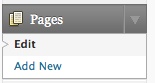
When installing WordPress it creates a page called "About". Let’s change that page into your bio page. Click on "About" in the center of the page. Change the title at the top of the page from "About" to "Bio".
In the text box, start adding your bio. It works like a simple word processor.
NOTE: The "return" key creates a full line space. If you only want a line break use shift-return.
I recommend that because of the vagaries of html you format your bio very simply as a list.
The following is moderately difficult to do in html:
| 2007 | Exhibition 1 |
| Exhibition 2 | |
| 2008 | Exhibition 3 |
| Exhibition 4 | |
| 2009 | Exhibition 5 |
| Exhibition 6 |
This is easy to do:
2007
Exhibition 1
2008
Exhibition 2
2009
Exhibition 3
When you are finished adding your bio. Click "Update Page" at the right. Don’t forget. Your work could be lost if you don’t.
Create Contact Page
While we are in Pages let’s create a contact page (if you have installed Contact Form 7).
Click "Contact" at the bottom of the left hand menu. Then copy this code including the square brackets:
contact-form 1 "Contact form 1"
Then Click "Pages" in the left hand menu.
Click "Add New".
Enter "Contact" as the title and then paste:
contact-form 1 "Contact form 1"
into the body of page, as shown below. Don’t forget the square brackets.
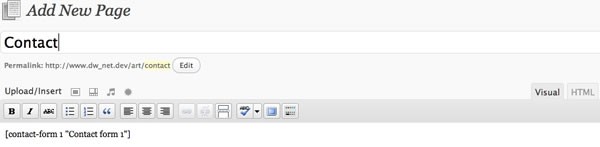
Click "Publish" on the right side. Click "View Post" to check the page. It should look something like this:
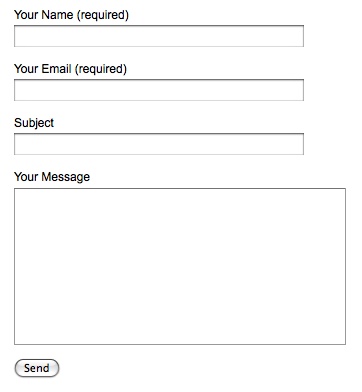
For more complex forms and troubling-shooting view Contact Form 7 Docs
Create Home Page
By default WordPress displays a list of recent posts on the front page of your site. These are instructions for displaying one large image on your front page.
Create another new "Page". Title it "Home". Upload one image and insert it into the page.
A horizontal image 900 x 600 pixels works best. Horizontal images work best since they match the format of computer screens (example).
If you would like to use more than one image I suggest compositing several images together as one image in Photoshop and simply use that.
Click "Publish" or "Update Page" in the right sidebar.
You are not done yet
Go to Settings->Reading
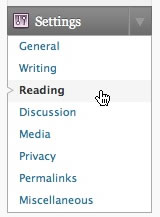
Click "A static page" and choose "Home" from the dropdown list. Click "Save Changes" at the bottom of the page.
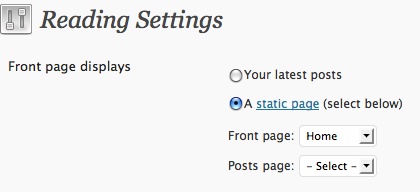
Check the front page on your site to see if it work.
For more information look at the WPFolio instructions or the WordPress instructions for creating a static home page. Voila!
Adding a Header Image
The WPFolio Wiki has good instructions for adding an header image to your site.
hey, how do you change the order in which your navigation bar is set up? For example, I would like my contact link to be at the end, but right now its in the middle.
Amanda,
[added Dec. 5, 2009] I have finally added some instructions for a Hack for Ordering Categories.
Thanks for the question. I knew this one would come up. Unfortunately there is no easy way to order the navigation menu, there are only work-arounds. It is not that hard to do but it is a little complicated for me to explain here and now. One way to begin is to disable the navbar widgets and change the php in header.php. You will have to look up wordpress template tags focusing on wp_list_pages and wp_list_categories. And you need to know a little bit about php. There are many tutorials out there. And my answer to pcNielsen about which comes first – pages or categories in Categories – Navigation Menu – will also help you get started.
Or another way would be to look for plugins that order categories and/or pages that allow for easy sorting and ordering.
Sorry that I don’t have a straightforward answer. I may publish my kludge-y work-around in the future but don’t have time right now and want to find a better solution.
There are two plugins that will order categories
My Category Order
Category Order
Read the installation instructions and the faqs. Check out their forums for trouble-shooting.
You can also try Menu Plus+. You will have to change some code in header.php. Follow the instructions provided by the plugin author.
Daniel
Hey Daniel,
I’ve been experimenting with adding a moving slideshow to my home page, using this plugin:
http://wordpress.org/extend/plugins/wordpress-gallery-slideshow/
however, when I activate it, lightbox stops working. Is there something in the code I can change, or should I try another slideshow plugin?
thanks,
sam
Sam,
Your site is looking good.
I am not sure what the problem is because I have not used the Gallery plugin you are using. One possibility is that Lightbox 2 is using Scriptaculous and the Gallery Slideshow is using jQuery, two different “frameworks” for javascript. Well-written plugins should not conflict with each other, however. I think it would be easiest and fastest to look for another plugin. Be sure to de-activate the Slideshow plugin and check to see if Lightbox-2 still works before you try different plugins. Another solution would be to look for a Lightbox plugin that uses jQuery. For example:
jQuery Lightbox
jQuery Lightbox for Native Galleries
jQuery Lightbox for Native Galleries
I am going to research this issue and hope to have something by the time we meet for class at Bard.